> ## Documentation Index
> Fetch the complete documentation index at: https://docs.kyosbot.xyz/llms.txt
> Use this file to discover all available pages before exploring further.
# VoiceMaster
## **What’s this?**
The **voicemaster** module **allows your community members to create voice channels for themselves. They simply join a voice channel named**🔊 Join to create \*\*and after, they will get a channel created for them. Whilst there, they can disconnect users, hide it, unhide it, change the user limit and **more**
## **Getting started**
To setup the voicemaster channels, it’s simplified all into one command.
By executing the `voicemaster setup` command, channels for the voicemaster will be created
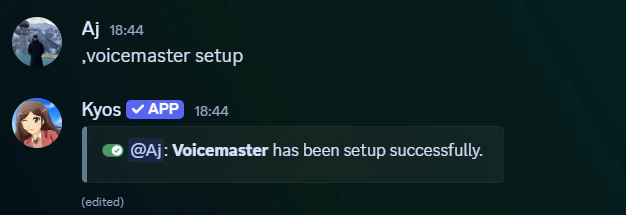 The following channels are created:
* **# interface** = The channel where our **voicemaster panel** is sent.
* **🔊 Join To Create** = When connected to, a new voice channel will be created for the user.
The following channels are created:
* **# interface** = The channel where our **voicemaster panel** is sent.
* **🔊 Join To Create** = When connected to, a new voice channel will be created for the user.
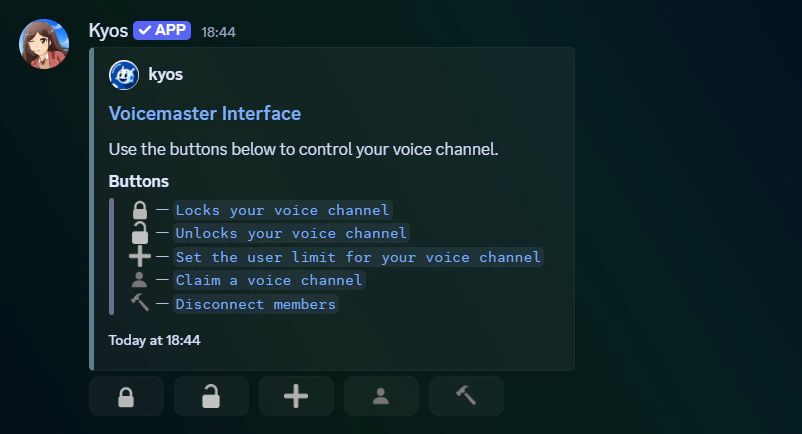 From here, you don’t have to do anything more! It’s all setup and ready for your community
## Customizing your voice channel
Wish to grant your friends permissiont to join your channel? Use the command below.
```javascript Syntax theme={null}
voicemaster permit (member)
```
```javascript Example theme={null}
voicemaster permit @aj.wtf.
```
To disconnect members from your voice channel, go to the **voicemaster panel** and click the hammer button.
To reject a member’s connect permissions to your voice channel, use the command below.
```javascript Syntax theme={null}
voicemaster reject (member)
```
```javascript Example theme={null}
voicemaster reject @aj.wtf.
```
To set your voice channels **user limit**, either use the command or the button on the **voicemaster panel.**
```javascript Syntax theme={null}
voicemaster limit (limit)
```
```javascript Example theme={null}
voicemaster limit 3
```
To prevent unwanted members joining your channel, you can lock it. Use either the command or the button on the **voicemaster panel.**
```javascript Syntax theme={null}
voicemaster lock
```
```javascript Example theme={null}
voicemaster lock
```
To open your voice channel, you can unlock it. Use either the command or the button on the **voicemaster panel**
```javascript Syntax theme={null}
voicemaster unlock
```
```javascript Example theme={null}
voicemaster lock
```
If the owner of a voicemaster channel has left, you may claim it and make it yours. Use either the command or the button on the **voicemaster panel.**
```javascript Syntax theme={null}
voicemaster claim
```
```javascript Example theme={null}
voicemaster claim
```
From here, you don’t have to do anything more! It’s all setup and ready for your community
## Customizing your voice channel
Wish to grant your friends permissiont to join your channel? Use the command below.
```javascript Syntax theme={null}
voicemaster permit (member)
```
```javascript Example theme={null}
voicemaster permit @aj.wtf.
```
To disconnect members from your voice channel, go to the **voicemaster panel** and click the hammer button.
To reject a member’s connect permissions to your voice channel, use the command below.
```javascript Syntax theme={null}
voicemaster reject (member)
```
```javascript Example theme={null}
voicemaster reject @aj.wtf.
```
To set your voice channels **user limit**, either use the command or the button on the **voicemaster panel.**
```javascript Syntax theme={null}
voicemaster limit (limit)
```
```javascript Example theme={null}
voicemaster limit 3
```
To prevent unwanted members joining your channel, you can lock it. Use either the command or the button on the **voicemaster panel.**
```javascript Syntax theme={null}
voicemaster lock
```
```javascript Example theme={null}
voicemaster lock
```
To open your voice channel, you can unlock it. Use either the command or the button on the **voicemaster panel**
```javascript Syntax theme={null}
voicemaster unlock
```
```javascript Example theme={null}
voicemaster lock
```
If the owner of a voicemaster channel has left, you may claim it and make it yours. Use either the command or the button on the **voicemaster panel.**
```javascript Syntax theme={null}
voicemaster claim
```
```javascript Example theme={null}
voicemaster claim
```