> ## Documentation Index
> Fetch the complete documentation index at: https://docs.kyosbot.xyz/llms.txt
> Use this file to discover all available pages before exploring further.
# Join roles
Ensure kyos is **above** the role you want it give else your autoroles **will not work**
## Adding an autorole
Any roles with **dangerous permissions** will **automatically** not be granted and removed by kyos if an autorole
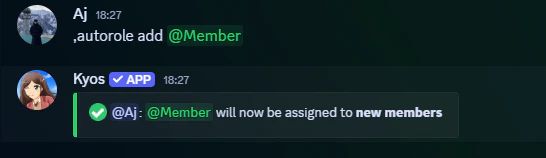
To add an autorole execute the following command
```javascript Syntax theme={null}
,autorole add (role)
```
```javascript Example theme={null}
,autorole add @role
```
 ## Removing an autorole
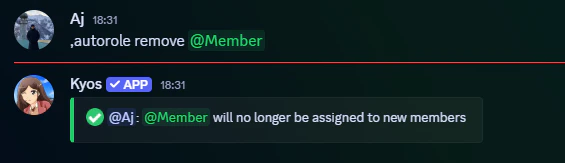
To remove an autorole, execute the following command. This will be permanently removed unless autorole add is executed again for the removed role
```javascript Syntax theme={null}
,autorole remove (role)
```
```javascript Example theme={null}
,autorole remove @role
```
## Removing an autorole
To remove an autorole, execute the following command. This will be permanently removed unless autorole add is executed again for the removed role
```javascript Syntax theme={null}
,autorole remove (role)
```
```javascript Example theme={null}
,autorole remove @role
```
 ## Viewing the autoroles
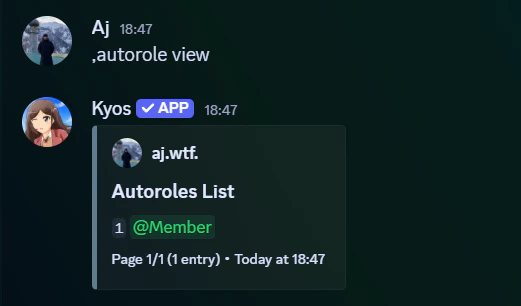
To view the current autoroles, simply execute the the following command
```javascript Syntax theme={null}
,autorole view
```
```javascript Example theme={null}
,autorole view
```
## Viewing the autoroles
To view the current autoroles, simply execute the the following command
```javascript Syntax theme={null}
,autorole view
```
```javascript Example theme={null}
,autorole view
```
 ## Clearing autoroles
To clear the current autoroles, execute the following command:
This will **permanently** remove **all autoroles** at once.
```javascript Syntax theme={null}
,autorole clear
```
## Clearing autoroles
To clear the current autoroles, execute the following command:
This will **permanently** remove **all autoroles** at once.
```javascript Syntax theme={null}
,autorole clear
```